Office Tool Plus 10.26.36.0 一键部署微软 Office


描述
Office Tool Plus 是一个Office管理工具,它集成了Office管理、下载、安装、激活和文档转换。使用这个工具,您可以在 windows 7、 windows 8和 windows 10以及企业批量部署中快速安装 office,大大简化了 office 的安装和使用。启动版本包括 office 2016和 office 2019。用户可以自定义所需组件的部署和安装,这最适合于办公环境。
多版本支持
Office Tool Plus至少与Win 7系统可以兼容。Office Tool Plus附带的自动进行更新教育功能可确保您自己始终没有获得一个最佳学习体验
强大的定制功能
Office工具Plus支持Office部署工具的所有功能,同时增强了一些功能,为您提供更好的体验
丰富的功能
除了支持ODT的所有功能外,Office Tool Plus还添加了许多实用和方便的功能,使其成为一站式办公管理平台
一键式生成配置
Office Tool Plus支持创建XML文件,因此您可以使用动态密码快速生成XML文件,并在其他机器上部署Office
永远保持最新
Office Tool Plus从Microsoft server获取Office的版本信息和安装文件,以确保您下载和安装的Office始终是最新版本。
截图
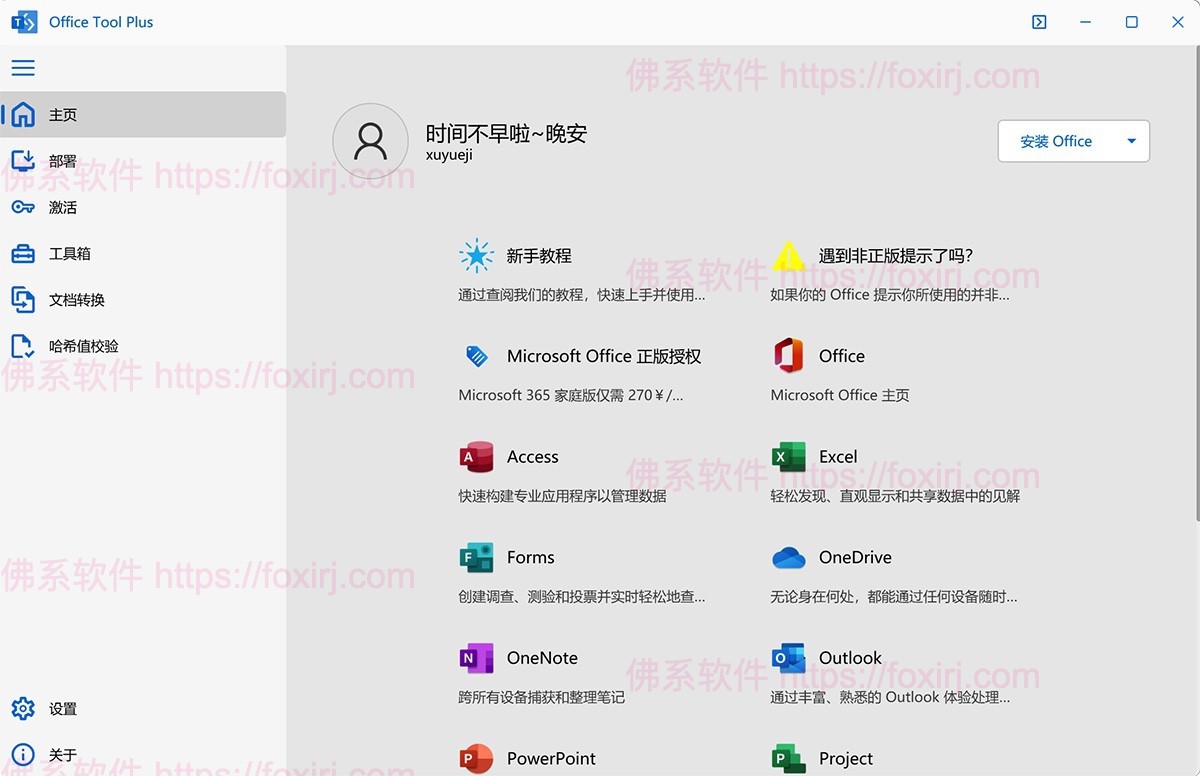
更新日志
Change log
- When executing deploy commands, Office Tool Plus will return the exit code same as Office installer returned.
- The progress will be displayed during the update.
- Other bugs fixed and improvements.
Deploy
- Supports verification of signature validity to ensure the integrity of the Office installer.
- Supports verification of Office installation file directory integrity.
- Updated the built-in File Generator rules, no longer download
i{arch}{lcid}.caband*.catfiles when downloading newer versions of Office installation files.
Toolbox
- Added new module Environment Variable Manager, allowing you to view or repair the user or system variables.
- The Office Installer Events Viewer is upgraded to the Office Events Viewer, which supports viewing or collecting logs of Office applications.
- Optimized the JSON formatting function of the Office Events Viewer, making it faster.
- Optimize the Office removal function to determine whether the taskbar folder exists for the built-in administrator account.
- Fixed an issue where some registry keys would not be cleaned up when removing Office.
Settings
- Supports suspend the system (sleep or hibernation status) after deployment is complete.
- Fixed an issue where Fast Startup did not take effect when shutting down the computer using Office Tool Plus after deployment is complete.
- Fixed an issue where Office Tool Plus crashes when exiting Office Tool Plus after deployment is complete.
Contributors
Translation: @igorruckert @AnomSanjaya @iDolmatov @VenusGirl @bovirus
使用说明
直接安装
文件属性
| 版本:10.26.36.0 | 开发者:YerongAI |
| 大小:81MB | 激活方式:免费版 |
| 语言:中文简体 | 处理器:Intel |
| 兼容性:Win 7及以上 |
软件下载
百度网盘

来源:百度网盘 | 提取码:r5e3
夸克网盘

来源:夸克网盘 | 提取码:6Z67
此内容仅限VIP查看,请先登录
版权与免责声明
本站名称:
佛系软件
永久网址:
https://foxirj.com/
1
本文内容遵守 CC BY-NC-SA 4.0 协议,转载请注明出处及本站链接。
2
本站资源大多存储在云盘网盘,如遇链接失效或提取异常,请在评论区提醒,我们将尽快修复。
3
本站部分资源来源于网络,仅供交流学习。如有侵权,请联系邮箱
2977443056@qq.com
核实后火速删除。
4
5
免责声明与法律条款:
根据《计算机软件保护条例》第十七条规定,为了学习和研究软件内含的设计思想和原理,通过安装、显示、传输或者存储软件等方式使用软件的,可以不经软件著作权人许可,不向其支付报酬。本站所有资源均收集整理自互联网公开渠道,仅供个人技术研究、学习与交流,严禁用于任何商业牟利或非法用途。请在下载后 24 小时内 从设备中完全删除;若因超期留存或商业使用产生版权争议,责任均由使用者自行承担。如您喜欢该软件,请支持并购买官方正版授权。
THE END